
To unlock a Xiaomi bootloader running HyperOS, you first need to apply for unlocking permission through the Xiaomi Community app. After approval, bind your Xiaomi Account to your phone through Developer Options and use the official Mi Unlock Tool on a Windows PC.
The process can erase all your phone data, so create a complete backup before proceeding.
Key Takeaways
- HyperOS users need Xiaomi Community unlocking permission.
- The same Xiaomi Account must be used on the phone and Mi Unlock Tool.
- You need a Windows PC and a working USB data cable.
- Unlocking can erase all personal data.
- An unlocked bootloader can affect security and application compatibility.
What Is a Xiaomi Bootloader?
A bootloader is a small programme that runs when you switch on your smartphone. It checks and starts the operating system.
Xiaomi ships its smartphones with a locked bootloader to help protect the system from unauthorised software modifications.
Unlocking it allows users to make deeper software changes, such as installing supported custom ROMs, custom recoveries and root-related modifications.
Important: Bootloader unlocking is different from SIM unlocking. It does not remove network or carrier restrictions.
Can You Unlock a Xiaomi Bootloader on HyperOS?
Yes, but Xiaomi has introduced an additional permission requirement for HyperOS devices.
According to Xiaomi’s official guidance, unlocking permission is available only to selected users. Applications must be submitted through the Xiaomi Community app.
Xiaomi also specifies that the unlocking programme applies to accounts registered outside Mainland China and non-Mainland-China devices. Therefore, an officially sold Indian-market device and an Indian Xiaomi Account fall within the relevant regional category, but approval is not guaranteed.
For HyperOS users, the process generally involves:
- Applying for bootloader unlock permission.
- Binding the Xiaomi Account to the phone.
- Connecting the device to Mi Unlock Tool.
- Completing the unlocking process after any required waiting period.
Requirements Before Unlocking
Prepare the following items before starting:
| Requirement | Purpose |
|---|---|
| Xiaomi smartphone | Compatible device with a locked bootloader |
| Xiaomi Account | Permission application and account binding |
| Xiaomi Community app | Request unlocking permission |
| Active SIM card | Account and device verification |
| Windows PC | Running Mi Unlock Tool |
| USB data cable | Connecting the phone |
| Backup | Protecting personal data |
You should also enable Developer Options, OEM unlocking and USB debugging where available.
How to Unlock Xiaomi Bootloader on HyperOS
Follow these steps carefully. Menu names can differ slightly depending on your Xiaomi, Redmi or POCO model.
Step 1: Enable Developer Options
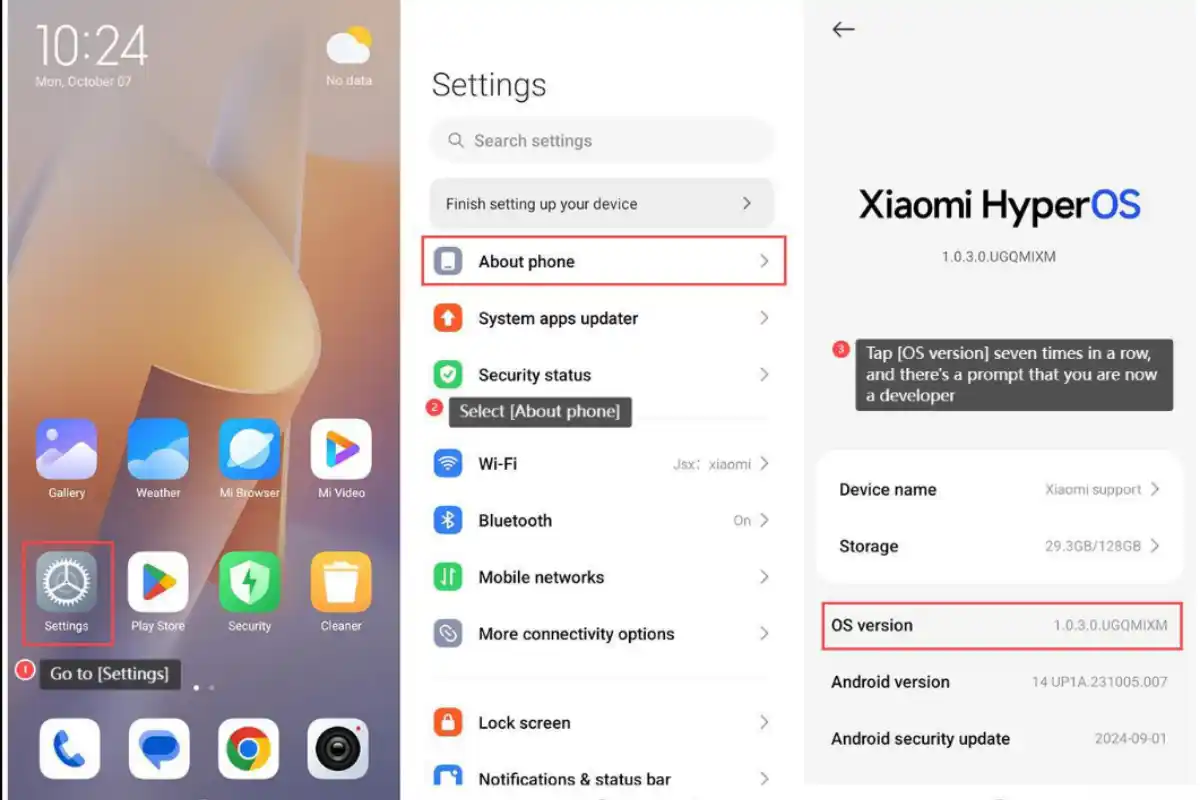
- Open Settings on your Xiaomi phone.
- Select About Phone.
- Find the HyperOS version information.
- Tap the version repeatedly until Developer Options becomes available.
- Return to Additional Settings.
- Open Developer Options.
Step 2: Apply for Unlocking Permission
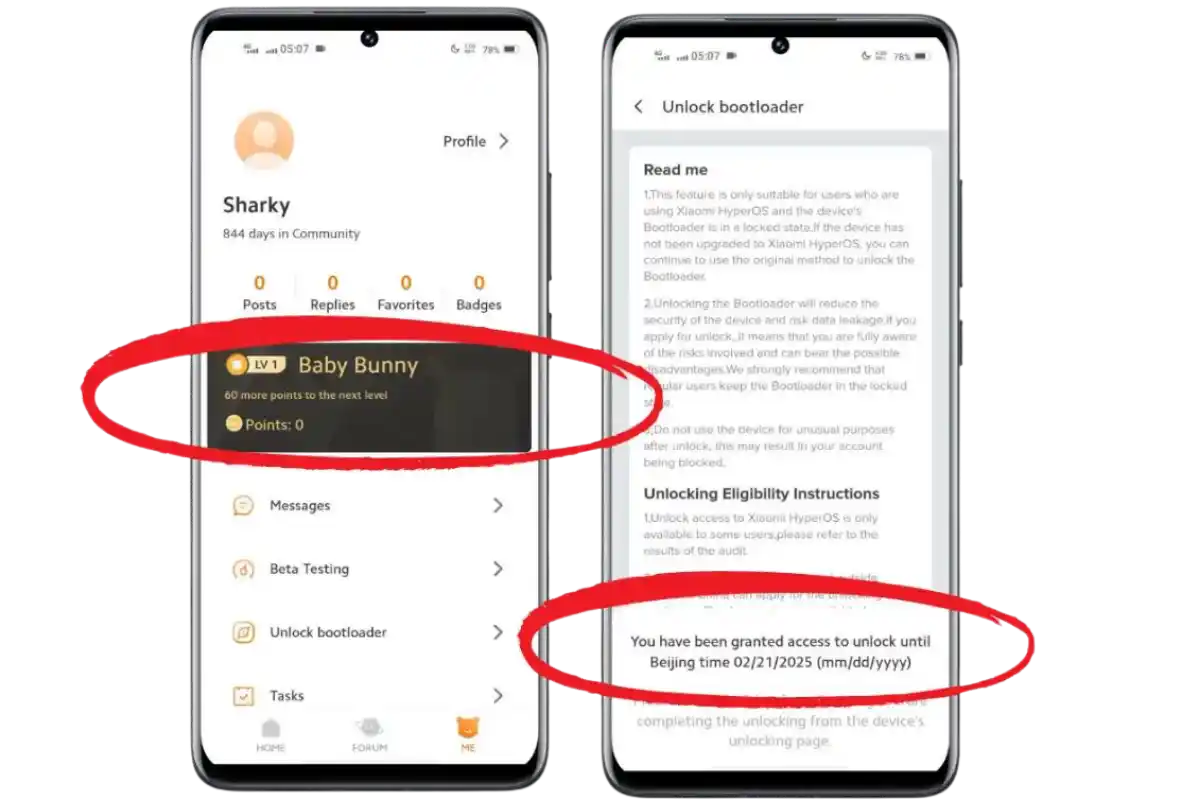
- Install or update the Xiaomi Community app.
- Sign in using your Xiaomi Account.
- Open the Me section.
- Look for Unlock Bootloader.
- Select the application option.
- Follow the instructions displayed in the app.
Xiaomi’s published announcement specifies Xiaomi Community app version 5.3.31 or newer for this process. Use the latest available version rather than an old APK.
Approval is not automatic. Xiaomi also operates an application quota, so you may need to try again later when the app reports that the quota has been reached.
Step 3: Bind Your Xiaomi Account to the Device
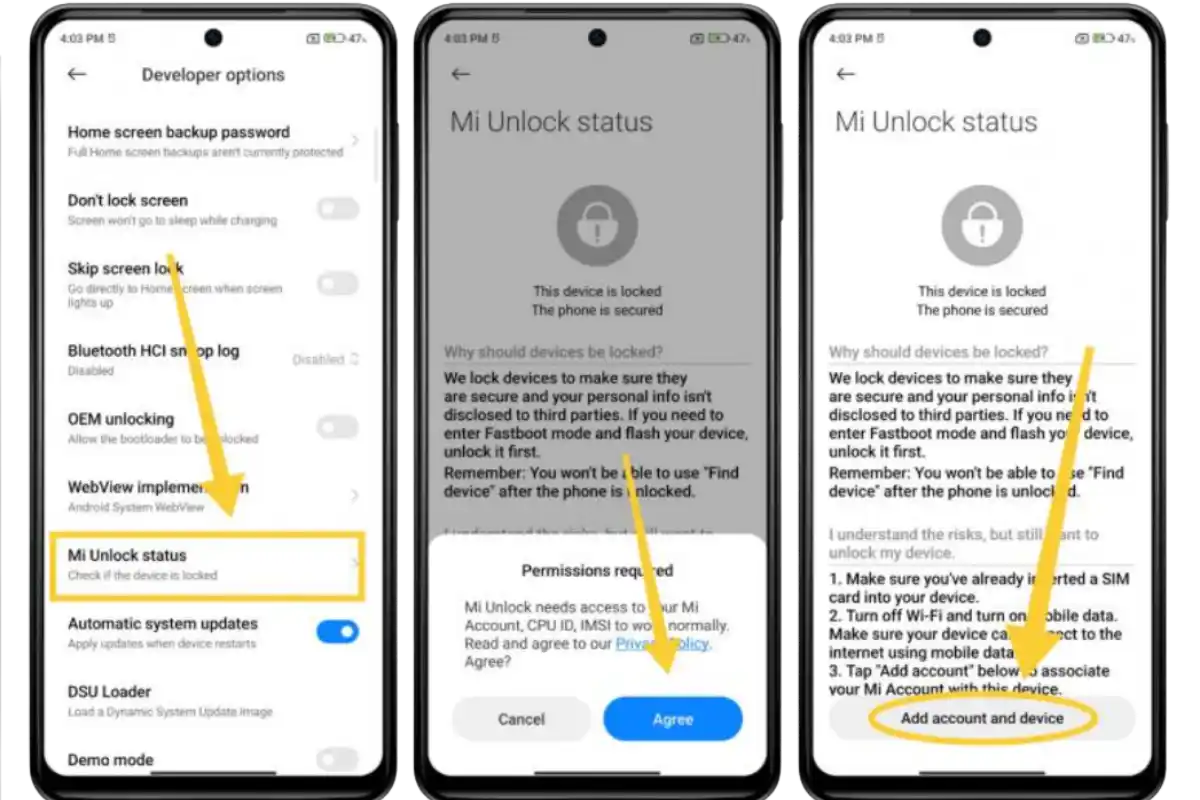
After receiving permission:
- Make sure the approved Xiaomi Account is signed in on your phone.
- Open Settings.
- Go to Additional Settings.
- Select Developer Options.
- Open Mi Unlock Status or Device Unlock Status.
- Agree to the terms.
- Select Add Account and Device.
Use the same account that received the unlocking permission. Xiaomi also requires a valid SIM card for the binding process.
Step 4: Download and Open Mi Unlock Tool
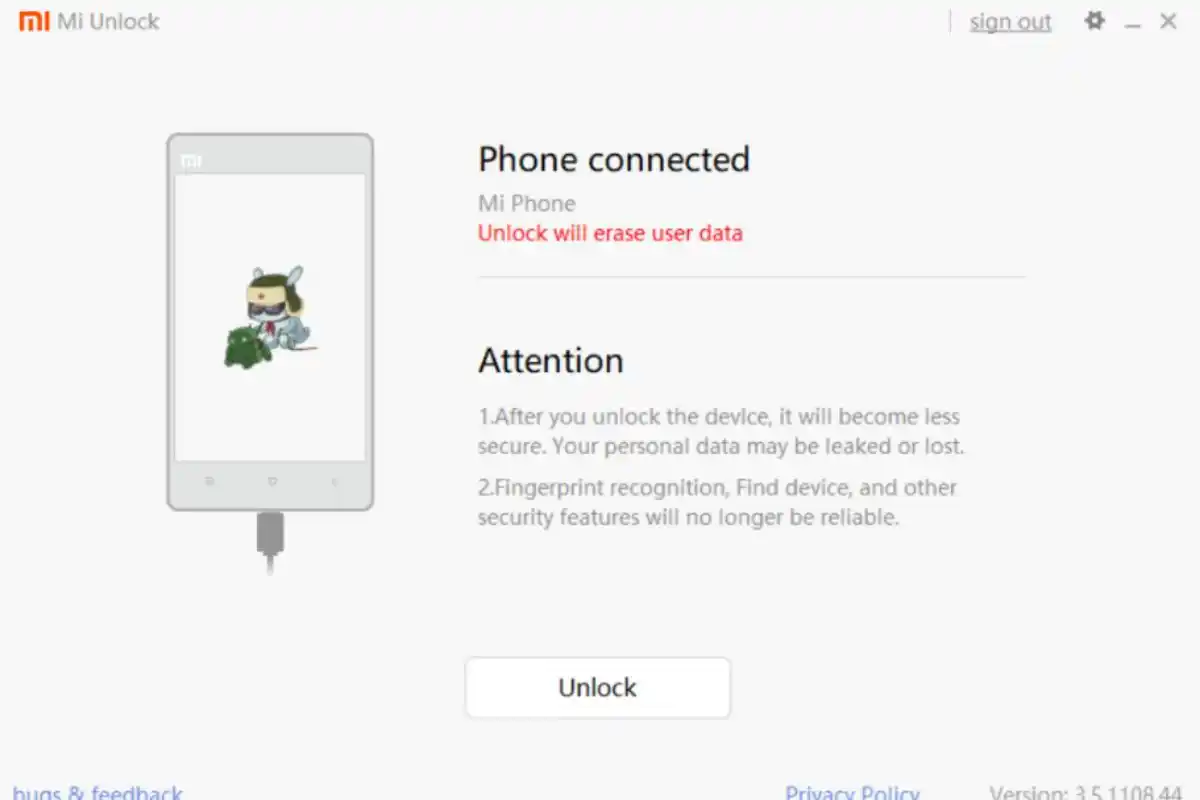
- Download the Mi Unlock Tool from Xiaomi’s official unlock page: Official Xiaomi Bootloader Unlock Page
- Extract the downloaded files on your Windows PC and open the Mi Unlock application.
- Sign in using the same Xiaomi Account linked to your phone.
Avoid unofficial unlocking tools and paid services that claim to bypass Xiaomi’s approval process. Xiaomi identifies Xiaomi Community as its official permission application channel.
Step 5: Enter Fastboot Mode
- Switch off your Xiaomi phone.
- Press and hold the Power and Volume Down buttons together.
- Release the buttons when Fastboot mode appears.
- Connect your phone to the Windows PC using a USB data cable.
Step 6: Unlock the Bootloader
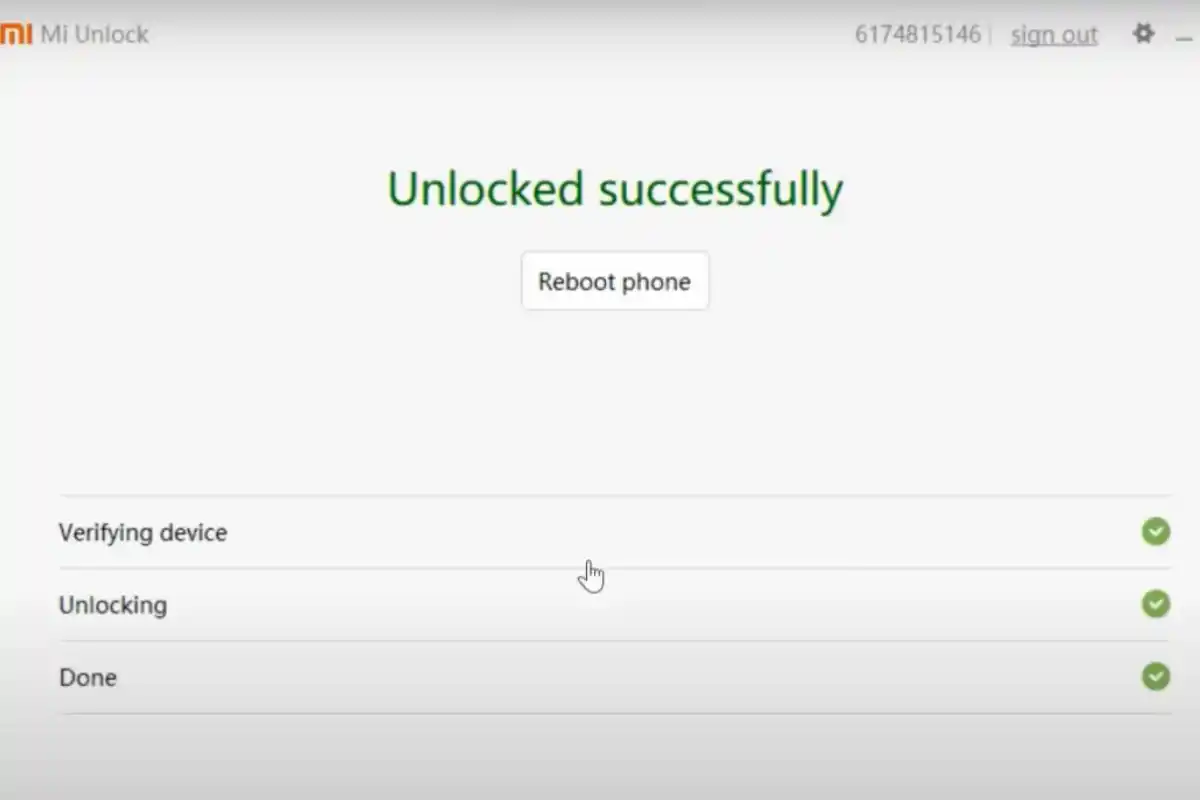
- Open Mi Unlock Tool.
- Sign in with your approved Xiaomi Account.
- Connect your phone in Fastboot mode.
- Wait for the software to detect your device.
- Select Unlock and follow the confirmation instructions.
- If a waiting period appears, wait until the displayed time expires.
- Repeat the unlocking process when permitted.
The phone will normally erase its data during the unlocking process and restart.
Note: Do not assume every Xiaomi phone has the same waiting period. Follow the time displayed by Mi Unlock Tool. Xiaomi’s official FAQ describes waiting periods exceeding seven days in certain cases.
Benefits of Unlocking Xiaomi Bootloader
Unlocking the bootloader can be useful for advanced Android users.
| Benefit | Explanation |
|---|---|
| Custom ROMs | Install compatible third-party Android ROMs. |
| Root access | Unlock the ability to use supported root methods. |
| Custom recovery | Install a compatible custom recovery. |
| System customisation | Make deeper changes to supported system components. |
| Development | Test custom kernels and software modifications. |
Remember that unlocking the bootloader does not automatically install a custom ROM or provide root access. Those require additional procedures.
Risks and Disadvantages
Before proceeding, understand the possible disadvantages.
- Data loss: Unlocking normally triggers a factory reset.
- Security: An unlocked bootloader reduces some of the security protections provided by the locked boot state.
- Warranty: Xiaomi’s global guidance warns that unlocking can affect warranty coverage and service.
- Application compatibility: Some banking, payment and security-sensitive apps may restrict functionality.
- System instability: Incorrect firmware or incompatible software can cause boot failures.
- Updates: Custom firmware and device-specific update policies can affect the normal update experience.
One important consideration for Indian users is application compatibility. Google’s Play Integrity documentation explains that, on Android 13 and newer, the MEETS_DEVICE_INTEGRITY verdict requires hardware-backed proof of a locked bootloader and certified manufacturer software. Applications using these checks may therefore restrict certain functions on modified devices. This does not mean every banking application will automatically stop working.
Does Unlocking Affect Xiaomi Warranty in India?
Xiaomi India’s warranty policy specifically excludes handsets rooted by the user and lists certain unauthorised modifications and related damage as warranty exclusions.
Its global bootloader FAQ also warns that unlocking may affect warranty and service.
However, unlocking the bootloader and rooting a phone are not identical actions. Do not assume that every unlocked-but-unrooted device will receive the same service decision. Check with Xiaomi India before modifying a phone that is still under warranty.
Common Xiaomi Bootloader Unlock Problems
| Problem | What to do |
|---|---|
| Unlock option missing | Update Xiaomi Community and check the available account region and eligibility. |
| Application quota reached | Try again later according to the app’s instructions. |
| Account and device inconsistent | Use the same Xiaomi Account on both the device and computer. |
| Phone not detected | Check the USB cable, USB port and Windows USB drivers. |
| Waiting period displayed | Wait until the server-provided timer expires. |
| Unlock permission rejected | Check the official eligibility requirements; there is no guaranteed bypass. |
Do not repeatedly remove and re-add accounts or use unknown unlocking scripts to bypass server restrictions.
Final Verdict
Xiaomi bootloader unlocking is useful for enthusiasts who want to install custom ROMs, use root modifications or experiment with Android software.
However, the HyperOS permission process makes unlocking less straightforward than older MIUI methods. Indian users should first confirm their device eligibility, apply through Xiaomi Community and back up their data.
For regular users who mainly need normal smartphone features, security and official software support, keeping the bootloader locked is the better choice.
FAQ
1. Is Xiaomi bootloader unlocking still possible on HyperOS?
Yes. Xiaomi allows selected eligible users to apply for bootloader unlocking permission through the Xiaomi Community app. Approval is not guaranteed, and the phone must meet Xiaomi’s regional and account requirements.
2. Can I unlock my Xiaomi bootloader in India?
An officially sold Indian-market Xiaomi device falls within the non-Mainland-China device category specified by Xiaomi. However, you still need an eligible Xiaomi Account and unlocking approval through the official process.
3. Does Xiaomi bootloader unlocking erase all data?
Yes, you should expect a complete factory reset. Back up your photos, contacts, WhatsApp data, documents and authentication applications before proceeding.
4. Is Mi Unlock Tool free?
Xiaomi’s official Mi Unlock Tool is provided as part of its official unlocking process. Avoid websites or individuals charging money for supposed permission bypasses.
5. Does unlocking Xiaomi bootloader void the warranty?
Xiaomi’s global FAQ warns that unlocking can affect official warranty coverage. Xiaomi India’s warranty policy specifically excludes user-rooted handsets. The service outcome for an unlocked but unrooted device should be confirmed with Xiaomi India.
6. Can I unlock Xiaomi bootloader without a PC?
The standard official HyperOS procedure uses Mi Unlock Tool on a computer for the final unlocking stage. Be careful with third-party tools advertising completely PC-free unlocking.
7. Does an unlocked bootloader affect banking applications?
It can. Some security-sensitive applications use Google Play Integrity or other checks. An unlocked bootloader may prevent the device from meeting certain integrity requirements, although compatibility varies between applications.
8. What happens if Xiaomi bootloader unlock permission is rejected?
You cannot complete the normal official HyperOS unlocking process without the required permission. Check the Xiaomi Community application’s instructions and eligibility conditions instead of using unofficial bypass services.
9. What is the difference between bootloader unlocking and rooting?
Bootloader unlocking allows deeper system modifications and the installation of compatible software. Rooting gives applications elevated system privileges. Unlocking is often a prerequisite for root modifications, but it does not automatically root the device.
10. Can I lock the Xiaomi bootloader again?
Relocking is possible in supported circumstances, but it must be done using the correct official firmware for the exact device and region. Relocking with incompatible or modified firmware can cause serious boot problems.